Cluster Storage: Your Team's Shared Hard Drive in the Cloud

Stop copying datasets. Stop losing work. Start collaborating.
If you've ever trained a model on VESSL, you've probably had this moment: you spin up a workspace, download a 200GB dataset, train for hours, then terminate the workspace and realize the data is gone. Or maybe your teammate needs the same dataset, so they download it again into their own workspace. That's two copies of 200GB, burning through storage costs for no reason.
We built Cluster Storage to make this pain disappear.
What is Cluster Storage?
Think of it as a shared NAS drive that lives right next to your GPUs. It's a persistent, high-performance storage pool attached to a Kubernetes cluster that any workspace in your organization can mount simultaneously.
The keyword here is simultaneously. Unlike the old Workspace volume (which was locked to a single workspace), Cluster storage uses Read-Write-Many (RWX) semantics. Multiple workspaces can read from and write to the same storage at the same time, just like a shared network drive in an office.
Before: The Old Way
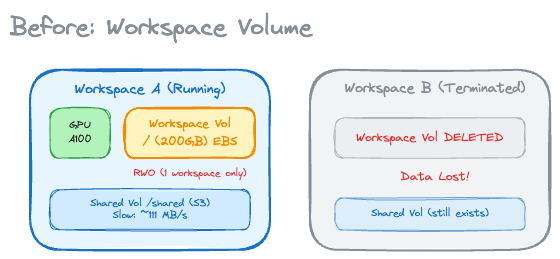
Pain points:
- Workspace volume was Read-Write-Once (RWO) — only one workspace at a time could use it
- Terminate a workspace? Your data vanishes
- Shared volume (S3-backed) works across clusters, but it's slow for training workloads
- Teams end up with duplicate copies of the same datasets
After: Cluster storage
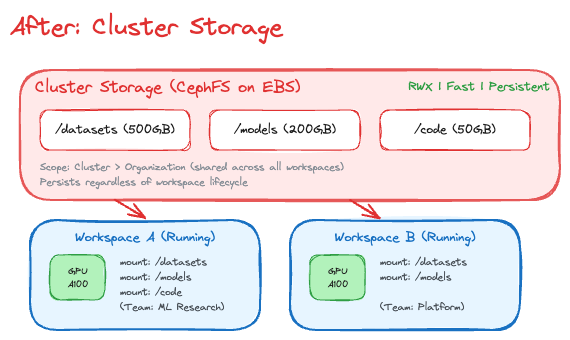
What changed:
- Read-Write-Many (RWX) — multiple workspaces can mount the same volume at once
- Data persists even when all workspaces are terminated
- Fast throughput (~200 MB/s on EBS + CephFS) - great for training
- Team-shared storage scoped to organization, not individual workspace
Why "Cluster" Storage?
The name tells you exactly where it lives: on the cluster. Cluster storage is physically co-located with your compute nodes, which is why it's fast. This is a deliberate design choice.
When your workspace reads a dataset from Cluster storage, the data travels over the cluster's internal network — not across the internet. This gives you near-local-disk throughput (~200 MB/s) while still being shared and persistent.
The trade-off? It's bound to one cluster. If you need to share data across clusters in different regions, that's what Object storage (S3-backed) is for. Think of it as choosing between the fast local drive and the cloud backup — sometimes you need both.
Reliable by Design: Distributed Storage
Under the hood, Cluster storage runs on CephFS, a production-proven distributed filesystem. Your data isn't sitting on a single disk hoping nothing goes wrong:
- Data: Protected by erasure coding (4 data chunks + 2 coding chunks), meaning the system can lose up to 2 storage nodes and still recover every byte
- Metadata Server: Active-standby failover for continuous availability
This is enterprise-grade storage — the same technology that powers some of the largest storage clusters in the world — packaged into a simple "create storage, mount it, done" experience.
Storage Tiering: Warm and Cold
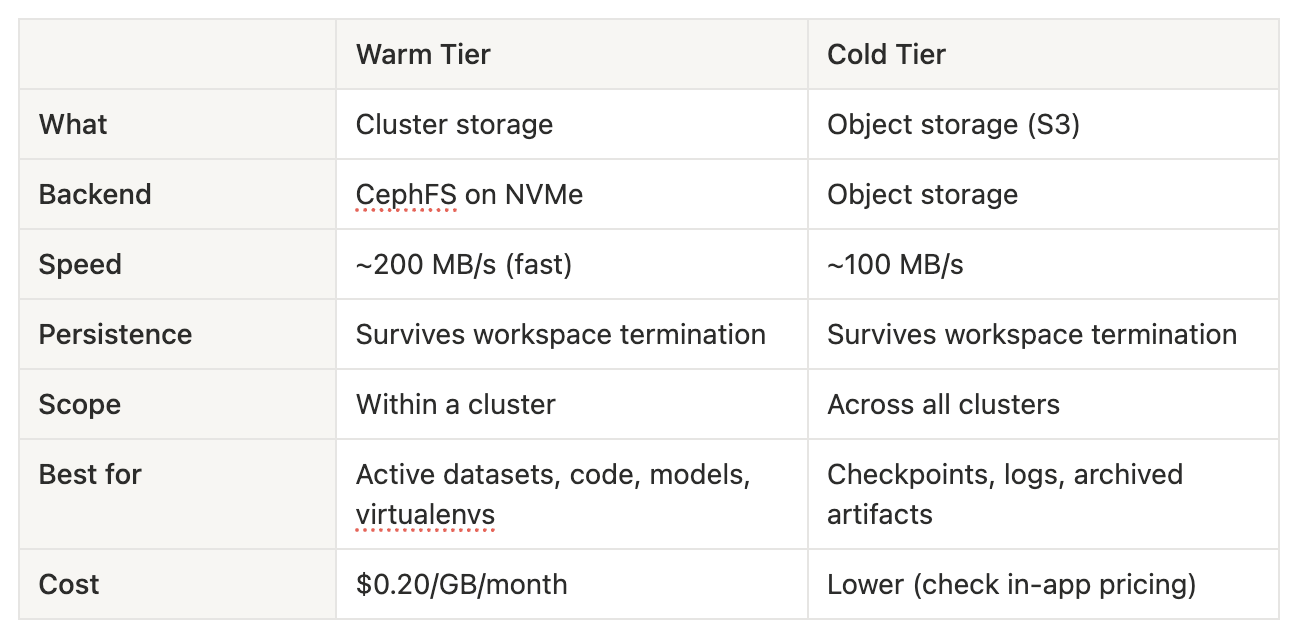
Not all data is created equal. A training dataset you're actively iterating on has very different requirements from last month's checkpoint logs. That's why VESSL Cloud offers two tiers of persistent storage:
What about Temporary storage?
Every workspace still gets ephemeral scratch space for caches, temp files, and intermediate results. This is blazing fast (local NVMe) but wiped when the workspace stops. Use it for things you can regenerate — not for things you'll cry about losing.
What Changed from Workspace Volume?
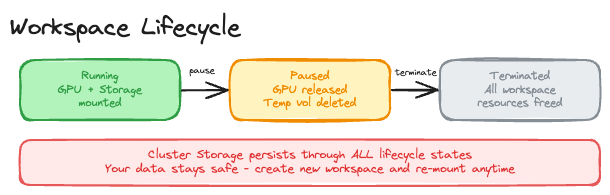
- Data on terminate: Legacy Workspace volume: Lost / Cluster storage: Preserved
- Sharing: Legacy Workspace volume: Single workspace only (RWO) / Cluster storage: Multiple workspaces (RWX)
- Mount path: Legacy Workspace volume: Fixed to /root / Cluster storage: User-configurable
- Team collaboration: Legacy Workspace volume: Not possible / Cluster storage: Built-in
If you have existing Workspace volume data, reach out to support@vessl.ai for migration assistance.
Future Works: Even Faster Storage
We're not stopping at CephFS. For workloads that demand extreme I/O — multi-node distributed training, large language model fine-tuning — we're working on bringing RDMA-level storage to the platform.
Technologies like AWS FSx for Lustre and WEKA can deliver throughput in the GB/s range (not MB/s), which is a game-changer for large-scale training. We already have the technical foundation for this, and plan to productize it in the near future.
Stay tuned.
FAQ
What is Cluster Storage?
Cluster Storage is high-performance persistent shared storage that lives inside the GPU cluster. It supports RWX (Read-Write-Many), so multiple workspaces can mount the same volume at the same time without duplicating datasets, and the data remains available after a workspace is terminated.
What is the difference between Cluster Storage and the legacy Workspace Volume?
The legacy Workspace Volume uses RWO (Read-Write-Once), so only one workspace can attach to it at a time and the data is lost when that workspace is terminated. Cluster Storage uses RWX, lets multiple workspaces mount the same volume simultaneously, preserves data after shutdown, and typically delivers about 130 to 150 MB/s for training-friendly access inside the cluster.
How does Cluster Storage keep data reliable?
Cluster Storage is built on CephFS. Metadata is replicated across three nodes, data is protected with 4+2 erasure coding so the system can tolerate multiple node failures, and the metadata service uses active-standby failover for high availability.
How are Warm Storage and Cold Storage different?
Warm Storage is for active datasets, code, models, and other files that need fast access during training. Cold Storage is better for checkpoints, logs, and archived artifacts that do not need cluster-local performance. Choosing the right tier helps balance speed, sharing scope, and storage cost.
How can I optimize storage for GPU training with Cluster Storage?
Keep active datasets and code on Cluster Storage so they stay close to the compute cluster, use Temporary Storage only for scratch data that can be regenerated, and move long-term artifacts to Object Storage. This reduces unnecessary copies and improves training throughput for team workloads.
VESSL AI
Subscribe to our newsletter
Monthly insights on building AI infrastructure, the latest GPU news, and more.