Don't tie a GPU to your agent

TL;DR
- Andrej Karpathy's
autoresearchis an open-source framework where an AI agent autonomously edits training code and iteratively improves model performance. - Running this sequentially on a single GPU takes hours. By fanning out experiments in parallel using VESSL Cloud's Job (batch job) feature, you can accelerate the overall wall-clock time by 4× at the exact same cost.
- This experiment pretrains a ~50M nanochat-derived GPT on the ClimbMix corpus.
The core idea behind Karpathy's autoresearch is compelling: an AI agent autonomously edits train.py, executes the training run, and evaluates the val_bpb metric. If the metric improves, the change is committed; otherwise, it is rolled back. Repeating this process 16 times allows the model to comfortably beat the baseline.
However, the original implementation runs these 16 trials sequentially on a single GPU, taking about two hours.
Running the exact same unmodified algorithm on VESSL Cloud reduces this time to 40 minutes. This yields a 4× throughput increase at the exact same cost. It utilizes the same H100 GPU at the $2.39 hourly rate, resulting in the same $5.28 total bill. The hardware didn't get faster—the scheduling did.
Where the speedup actually comes from
It's easy to mistakenly assume that sequential execution is intrinsic to the algorithm. It isn't. It's simply a hardware constraint: relying on a single local GPU forces sequential processing. It is true that the overall optimization must progress in sequential 'rounds'—you need the winning result from round 1 to define the starting point for round 2. However, within a single round, the agent is simply testing K different hypotheses (e.g., varying learning rates). These candidates are completely independent of each other. Instead of waiting for them to run one by one, you can evaluate all K candidates simultaneously, pick the best one, and move to the next round. You get the exact same outcome in a fraction of the time.
Deconstructing a single experiment reveals a massive bottleneck. While the actual GPU training takes only 5 minutes, it is bottlenecked by non-GPU tasks like downloading images, JIT compilation, and logging—which consume another 3 to 4 minutes.
In a sequential setup, your expensive $2.39/hr H100 sits idle for nearly half of the runtime. Across 16 experiments, that's roughly an hour of wasted GPU time just waiting for data and environments to load. Factor in the time the agent spends thinking and editing code between runs, and the inefficiency multiplies.
Shifting the mental model on VESSL Cloud
The traditional assumption that an agent must exclusively hold a single GPU for 24 hours is outdated. In a modern cloud environment, the agent does not interact with the GPU directly. It submits an experiment, receives an identifier (slug), and polls for the result before executing the next iteration.
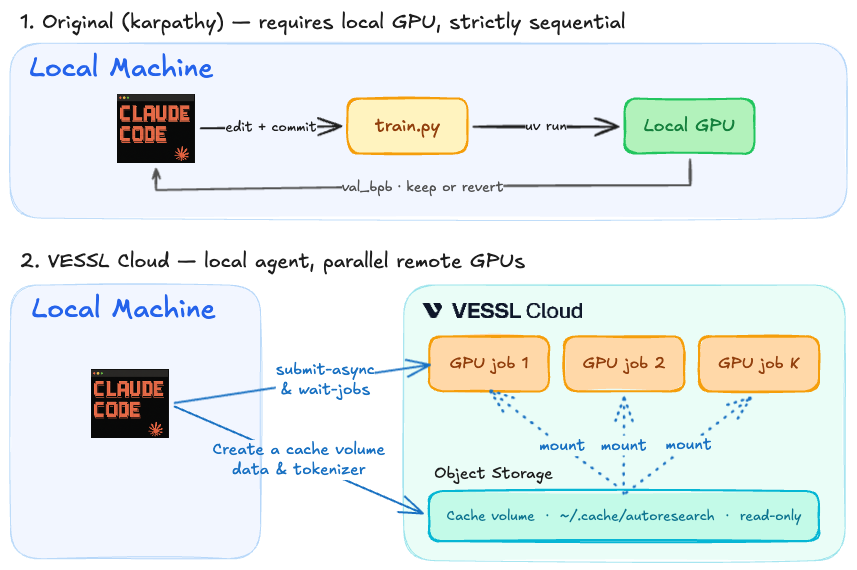
Based on the VESSL Cloud Cookbook, the actual end-to-end workflow looks like this:
- Hypothesis & Code Edit: The agent generates an idea, edits
train.py, and proposes K different candidate configurations. - Parallel Submission (Fan-out): The agent uses a CLI tool to submit all K candidates simultaneously as independent VESSL Jobs to the cloud.
- Aggregation & Optimization: Once the cloud jobs complete, the agent reviews the metrics, commits the best configuration, and moves to the next round.
To make this flow seamless and cost-effective, the cookbook implements three key architectural patterns:
1. Mount data once. A one-time prep job pulls the ~1 GB of ClimbMix shards into shared Object storage, and every subsequent experiment mounts that same volume read-only. No redundant data pulling per experiment.
2. Keep the agent hardware-blind. Executing vesslctl job create returns a job slug. The agent simply submits the workload and polls the status. It never needs to lease or manage compute directly.
3. Implement K-way fan-out per round. The submit-async.sh script dispatches K experiments in parallel, and wait-jobs.sh aggregates the results.
# Submit K=4 candidates per round, then wait for all of them
slugs=()
for branch in "${CANDIDATE_BRANCHES[@]}"; do
  git checkout "$branch"
  slugs+=( "$(bash batch-job/submit-async.sh)" )
done
bash batch-job/wait-jobs.sh "${slugs[@]}"
Running four candidates concurrently collapses what would have been a ~40-minute serial round into a single ~10-minute job wall. That's about 28 experiments per hour vs. ~7 sequentially—a 4× speedup.
Implementation is simpler than it sounds. Assuming the VESSL CLI is installed, just provide the vesslctl job create command to the agent via its prompt. The agent executes this command to submit the experiment and simply reads back the results.
Cloud billing is computed per GPU-time, so 16 trainings cost the same whether you queue them sequentially or fan them out four at a time. What collapses is the wall-clock time.
The unit economics flip
This approach fundamentally changes the unit economics of AI research. The number of experiments executed per dollar increases by 4×.
Using the exact same H100, codebase, and dataset, the idea velocity is quadrupled. Scaling the concurrency (K) increases this velocity further. The primary bottleneck becomes the concurrency budget, not the physical GPU count.
Consequently, the assumption that GPUs being half-idle is "normal" must be discarded. An agent doesn't need to monopolize a dedicated GPU 24/7. Instead, it is far more efficient for the agent to simply submit experiments to the cloud whenever needed, run them in parallel, and aggregate the results.
In short: Don't tie your agent to a dedicated GPU. Give it a scalable cloud environment where it can run experiments on demand.
What it looks like in practice
The setup: a ~50M nanochat-derived GPT (12 layers, 768 hidden, vocab 32k) pretrained on the ClimbMix corpus. Each run has a 5-minute training budget, evaluated by val_bpb (bits per byte, lower is better).
Executing a K=4 fan-out across 4 rounds on a single H100 SXM yielded the following:
| Round | Knobs | val_bpb | Outcome |
|---|---|---|---|
| 1 | EMBEDDING_LR, WEIGHT_DECAY, WINDOW_PATTERN | 1.0107 | Kept baseline |
| 2 | WARMDOWN_RATIO, ADAM_BETAS, MATRIX_LR, WARMUP_RATIO | 1.0081 | MATRIX_LR 0.04 → 0.05 |
| 3 | DEPTH, ASPECT_RATIO, TOTAL_BATCH_SIZE | 0.9986 | TOTAL_BATCH_SIZE 2^19 → 2^18 |
| 4 | (on top of c10) DEPTH, MATRIX_LR, WARMDOWN_RATIO, EMBEDDING_LR | 0.9856 | DEPTH 8 → 10 |
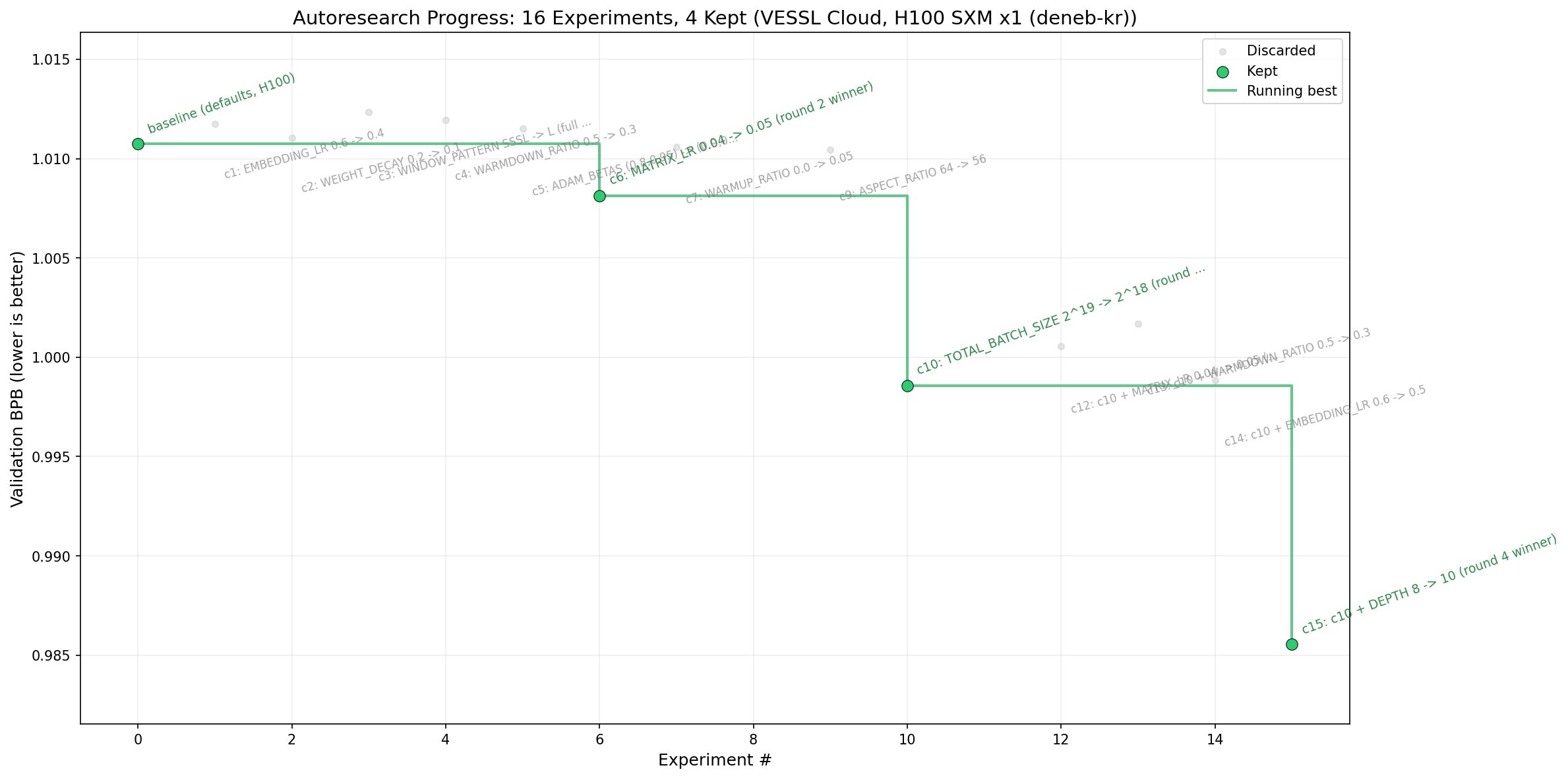
Round 4 achieved a val_bpb of 0.9856, surpassing Karpathy's 0.9979 reference. The total cost was $5.28, and the total wall time was 40 minutes. Sixteen structural experiments were completed in less than an hour.
Run it yourself
While this post covers the underlying mechanics and scheduling principles, bringing this to production requires the actual implementation. This pattern isn't limited to autoresearch—hyperparameter sweeps, Neural Architecture Search (NAS), and any single-GPU training entrypoint follow the exact same architecture.
The full reproducible code and ready-to-run scripts are available in the VESSL Cloud Cookbook. For initial environment configuration and step-by-step setup, refer to the VESSL Cloud Docs workflow guide.
FAQ
How do I determine K?
What prevents the agent from looping indefinitely and causing a cost explosion?
Does this apply to other GPUs like A100 or L4 (without flash-attn)?
Can I just use Kubernetes directly?
VESSL AI