2026 GPU Selection Guide — From L40S to B300

"Is H100 enough, or should we go with B200?" — this is the most common question teams face when choosing a GPU. As models grow larger and workloads diversify, the GPU landscape has expanded far beyond what it was just one generation ago.
In this guide, we compare the specs of major GPUs available in the cloud today and break down which GPU fits each workload. The criteria are straightforward: VRAM, compute performance, memory bandwidth, and GPU interconnect.
(The prices mentioned in this document are based on April 2026. Pricing may change thereafter, and the accurate current unit prices can be found on the VESSL Cloud Pricing page.)
Core Spec Comparison
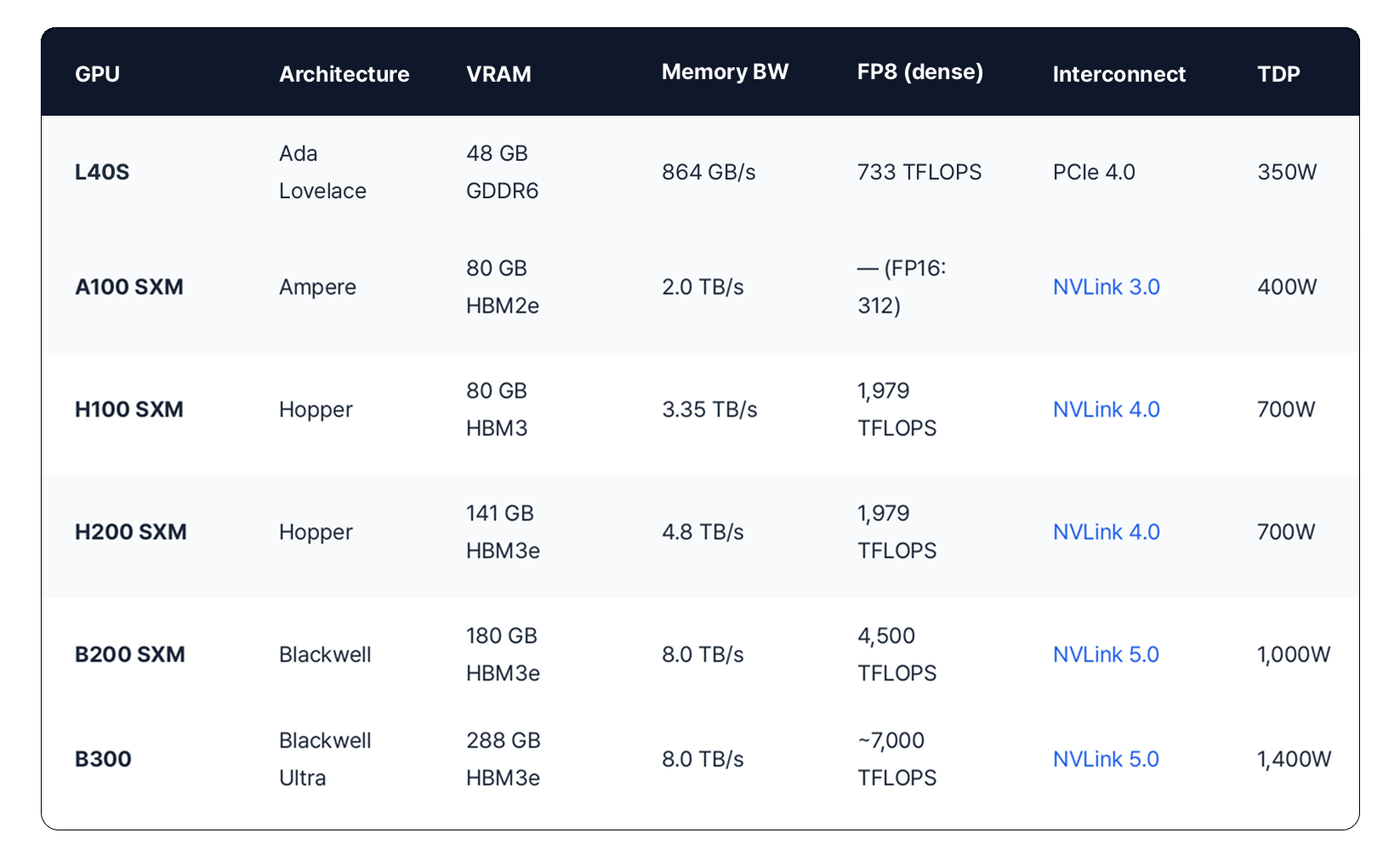
Here's a side-by-side comparison of all GPUs, focused on the four factors that matter most for workload selection: VRAM, memory bandwidth, compute (FP8), and interconnect.
How to Read These Specs
VRAM: Can Your Model Fit?
VRAM is the first thing to check. Model parameters and activation memory must fit in GPU memory for both training and inference. As a rough guide, a 7B model needs about 14 GB in FP16 for inference, and a 70B model needs about 140 GB. Training requires 3–4× more memory than inference due to optimizer states.
Memory Bandwidth: How Fast Tokens Come Out
In inference, token generation speed is largely determined by memory bandwidth. H100 (3.35 TB/s) and H200 (4.8 TB/s) have the same compute, but H200 delivers higher inference throughput — the difference is bandwidth.
Compute (FP8 TFLOPS): Training Speed
For training, compute directly determines how fast your model learns. FP8 is becoming the standard for modern model training, and the Blackwell generation supports FP4 as well. Note that A100 doesn't support FP8 — compare it using FP16.
Interconnect: The Multi-GPU Bottleneck
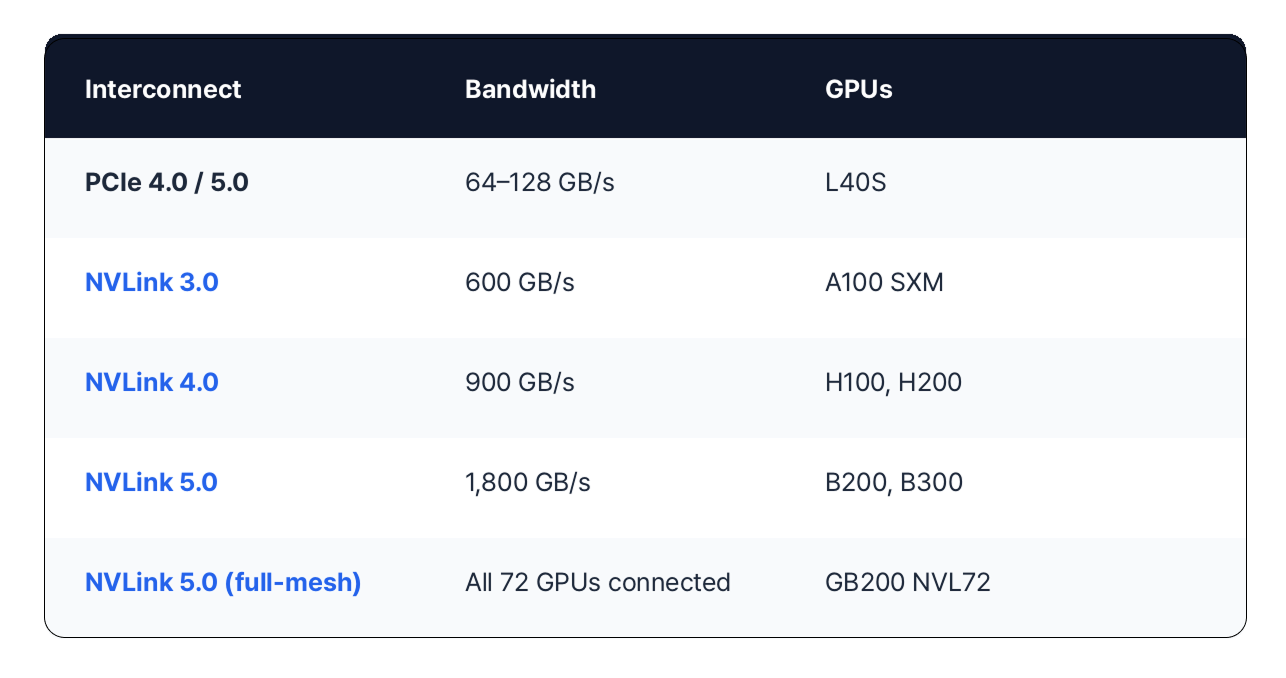
When a single GPU isn't enough, how fast GPUs can communicate with each other becomes critical. NVLink provides direct GPU-to-GPU connections, while PCIe routes through the motherboard — much slower. If you need multi-GPU training, SXM form factor with NVLink is the way to go.
GPU Recommendations by Workload
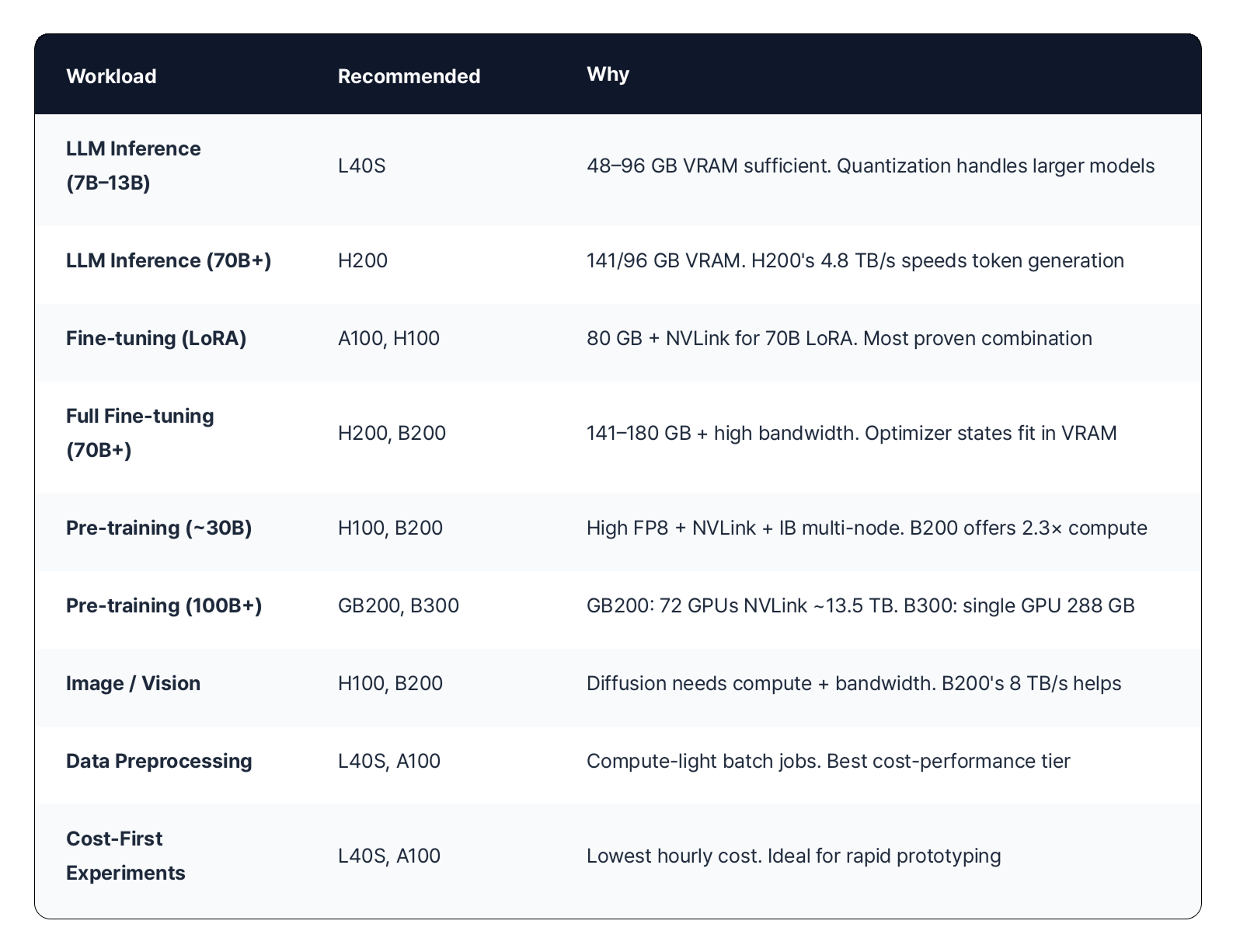
Now let's match GPUs to real workloads. There's no single "right answer," but there are sensible starting points based on model size and task type.
Availability on VESSL Cloud
All of the above GPUs are available through VESSL Cloud. Some can be provisioned instantly from the platform, while others are available through our sales team.
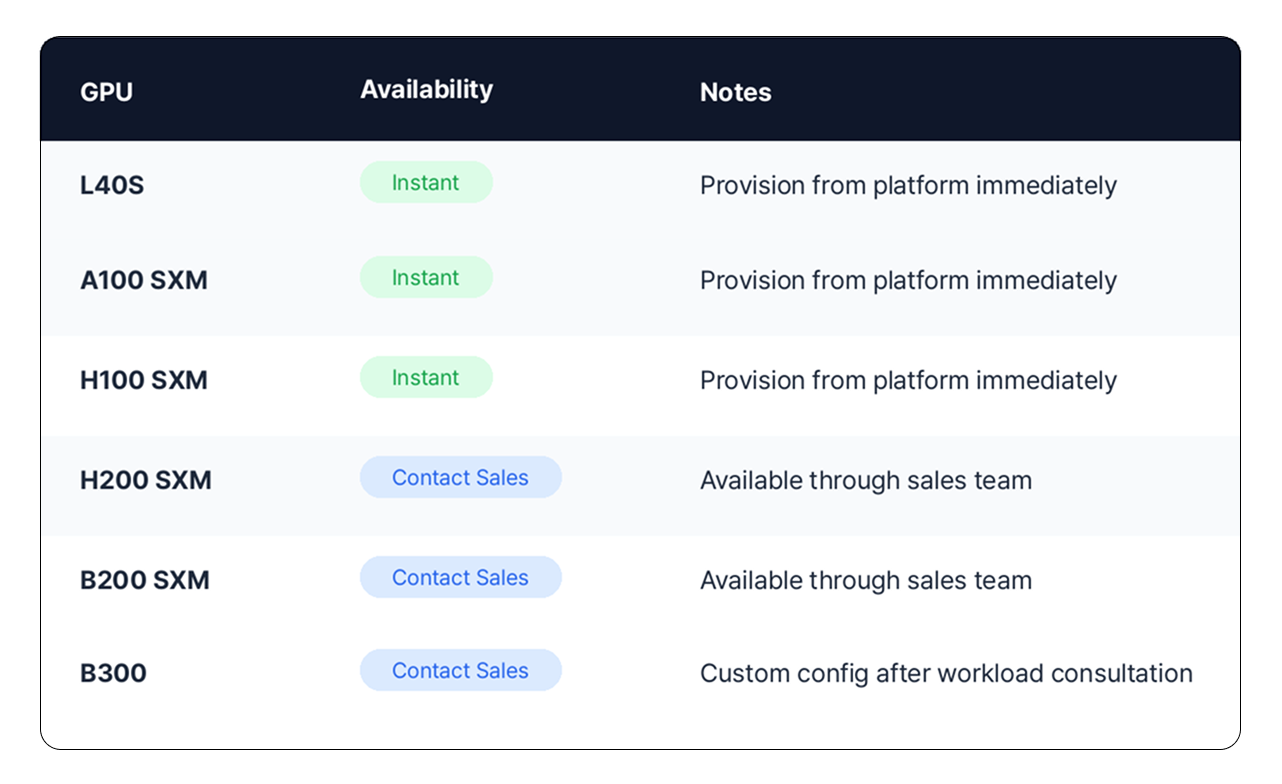
*GB300 has also joined the lineup, available on a reserved basis. The accurate current unit prices can be found on the VESSL Cloud Pricing page.)
GPUs on VESSL Cloud are all SXM-based (except L40S). As a Persistent GPU Cloud, your workspace environment — packages, data, and configurations — is preserved even when you pause your GPU.
FAQ
I'm using H100 — should I switch to B200?
It depends on your workload. If you're running into training time or VRAM limitations on H100, B200 is a clear upgrade — 2.3× compute, 2.3× VRAM, 2.4× bandwidth. But if H100 is working fine for you, there's no rush to switch. H100 has the most mature ecosystem and lower hourly cost than B200.
Can L40S be used for training?
Yes — for small-scale fine-tuning and experimentation. However, since they use PCIe (no NVLink), GPU-to-GPU communication is slow for multi-GPU training. They're best suited for single-GPU LoRA fine-tuning or inference experiments.
How do I estimate how much VRAM my model needs?
Here are rough guidelines:FP16 Inference: Parameters × 2 bytes. 7B model ≈ 14 GB, 70B model ≈ 140 GBINT8 Inference: Parameters × 1 byte. 70B model ≈ 70 GBTraining (FP16 + Adam): Parameters × ~18 bytes. 7B model ≈ 126 GBLoRA Fine-tuning: Base model memory + ~10–20% extraActual usage varies with activation memory, batch size, and sequence length. If you're not sure, just reach out — we'll recommend a configuration based on your workload.
How do I get started?
L40S, A100, and H100 can be provisioned instantly from VESSL Cloud. H200, B200, GB300, and B300 are available through our sales team. You don't need exact requirements — just tell us about your current situation and we'll suggest realistic options.Request a Workload Consultation
Related
References
VESSL AI
Subscribe to our newsletter
Monthly insights on building AI infrastructure, the latest GPU news, and more.